Laxmi
Laxmi
MS Word का Tools र Commands को विस्तृत परिचय
MS Word
Microsoft Word संसारकै सबैभन्दा लोकप्रिय word processing software हो। यसले text लेख्न, सम्पादन गर्न, formatting गर्न र professional document तयार पार्न अत्यन्तै सजिलो बनाउँछ। Word को interface मा विभिन्न Tools र Commands उपलब्ध छन्, जसले document निर्माण, सम्पादन, र presentation लाई प्रभावकारी बनाउँछ। यस लेखमा हामी MS Word का प्रमुख Tools र Commands को विस्तृत परिचय दिनेछौं।
1. Clipboard
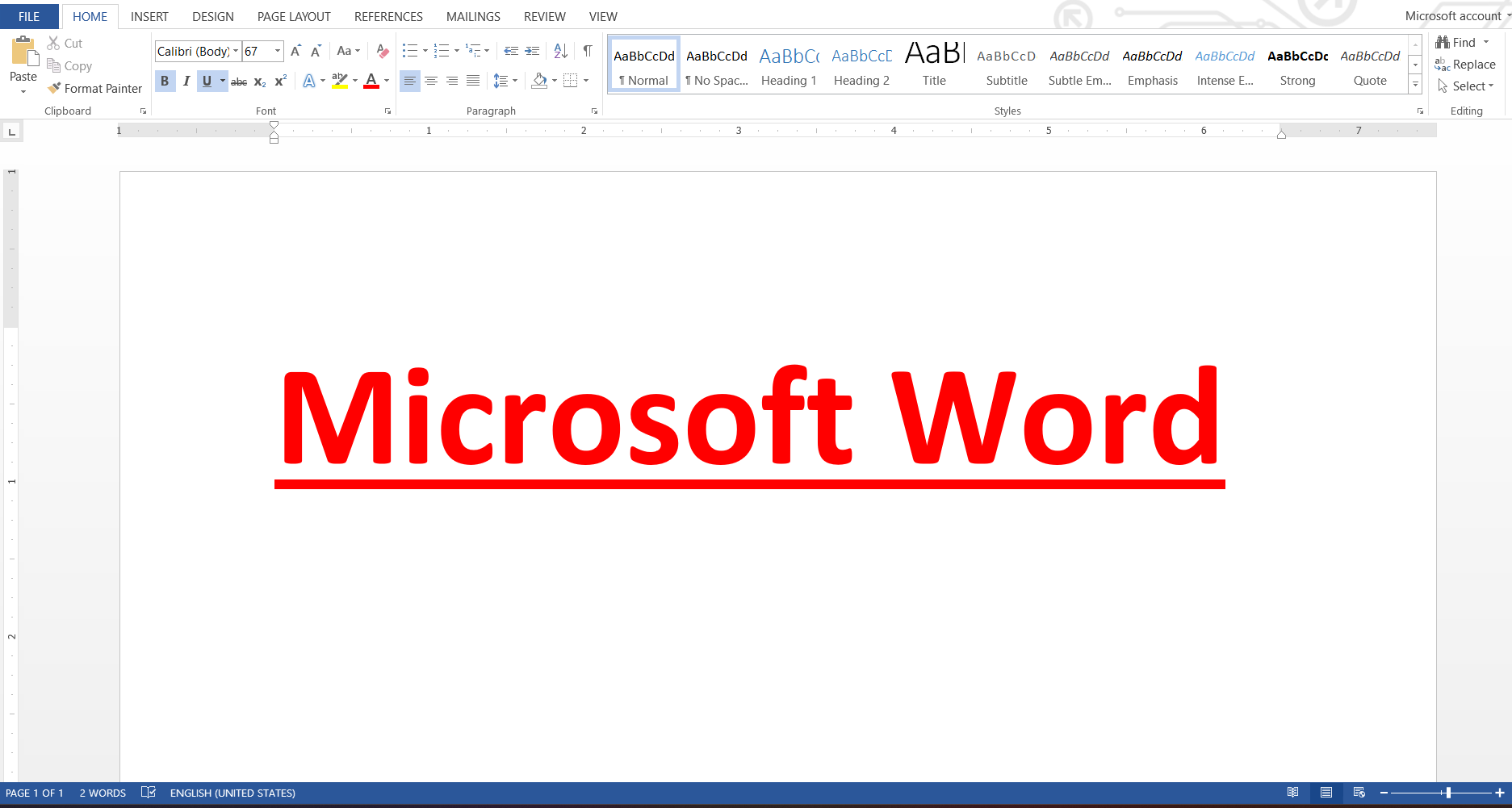
Clipboard Tool Word को सबैभन्दा आधारभूत र आवश्यक सुविधा हो। यसले text, images, tables, वा अन्य object हरूलाई Cut, Copy, र Paste गर्न मद्दत गर्छ।
- Cut: चयन गरिएको सामग्रीलाई Document बाट हटाएर Clipboard मा राख्छ।
- Copy: सामग्रीको duplicate बनाएर Clipboard मा राख्छ।
- Paste: Clipboard बाट चयन गरिएको सामग्री Document मा राख्छ।
- Format Painter: एउटा text को formatting अर्को text मा सजिलै लगाउन सकिन्छ।
Clipboard ले कामलाई तेज र efficient बनाउँछ, विशेष गरी ठूलो document सम्पादन गर्दा।
2. Font Tools
Font Tools ले text को appearance र style परिवर्तन गर्न प्रयोग हुन्छ। यसले Word document लाई professional र आकर्षक बनाउँछ।
- Font type: अक्षरको शैली परिवर्तन गर्न प्रयोग।
- Font size: अक्षरको आकार बढाउने वा घटाउने।
- Bold, Italic, Underline: Text लाई emphasize गर्ने।
- Strikethrough, Subscript, Superscript: विशेष formatting आवश्यक पर्दा।
- Text color & Highlight: पाठलाई रंग दिने वा highlight गर्ने।
Font Tools प्रयोग गर्दा document readability सुधारिन्छ र presentation आकर्षक देखिन्छ।
3. Paragraph Tools
Paragraph Tools ले text alignment, spacing, र structure नियन्त्रण गर्छ।
- Alignment: Left, Center, Right, Justify विकल्प।
- Bullets & Numbering: Lists बनाउने।
- Line & Paragraph Spacing: Line र paragraph बीचको दूरी नियन्त्रण।
- Shading & Borders: Paragraph को background रंग वा border थप्न सकिन्छ।
यी commands ले document लाई व्यवस्थित र professional देखिन्छ।
4. Styles
Styles Word को शक्तिशाली feature हो। यसले document consistency राख्न मद्दत गर्छ।
- Predefined Styles: Heading 1, Heading 2, Title, Subtitle, Normal।
- Custom Styles: आफूले चाहेको style create गर्न सकिन्छ।
Styles प्रयोग गर्दा headings, subheadings, र text formatting एकरूप देखिन्छ।
5. Insert Tools
Insert Tools ले document मा विभिन्न object र content थप्न मद्दत गर्छ।
- Pages: Cover Page, Blank Page, Page Break।
- Tables: Data organization र presentation।
- Illustrations: Pictures, Shapes, Icons, SmartArt, Charts।
- Links: Hyperlink, Bookmark, Cross-reference।
- Header & Footer, Text Box, WordArt, Drop Cap।
- Media: Audio, Video, Online content।
Insert Tools ले Word document लाई dynamic र interactive बनाउँछ।
6. Design Tools
Design commands ले document को visual appeal सुधार्छ।
- Themes, Colors, Fonts: Document को look र feel control।
- Watermark, Page Color, Page Borders: Document लाई professional र customized बनाउँछ।
Design Tools प्रयोग गर्दा presentation attractive र professional देखिन्छ।
7. Layout Tools
Layout commands ले page setup र paragraph positioning नियन्त्रण गर्छ।
- Margins, Orientation, Page Size, Columns, Breaks।
- Indent, Spacing, Positioning।
Layout Tools प्रयोग गर्दा report, proposal, वा academic paper सजिलो र professional देखिन्छ।
8. References Tools
References Tools मुख्यतः academic र research document हरूमा प्रयोग हुन्छ।
- Table of Contents, Footnotes, Endnotes।
- Citations & Bibliography, Captions, Index।
यी Tools प्रयोग गर्दा academic document preparation सजिलो र systematic हुन्छ।
9. Mailings Tools
Mailings commands ले envelopes, labels, र mail merge गर्न मद्दत गर्छ।
- Create: Envelopes, Labels।
- Start Mail Merge, Insert Merge Field, Finish Merge।
Mailings Tools प्रयोग गर्दा ठूलो संख्यामा personalized letters र documents पठाउन सजिलो हुन्छ।
10. Review Tools
Review commands ले proofreading र collaboration मा मद्दत गर्छ।
- Spelling & Grammar, Thesaurus, Word Count।
- Comments, Track Changes, Accept/Reject Changes।
- Compare, Protect Document।
Review Tools प्रयोग गर्दा document accuracy र quality सुनिश्चित हुन्छ।
11. View Tools
View commands ले document display र workspace customization गर्छ।
- Views: Read Mode, Print Layout, Web Layout, Outline, Draft।
- Ruler, Gridlines, Navigation Pane।
- Zoom, New Window, Split, Switch Windows, Macros।
View Tools ले workflow efficient बनाउँछ र editing सजिलो बनाउँछ।
निष्कर्ष
MS Word का Tools र Commands हरूले तपाईंलाई professional document बनाउन, formatting सुधार्न, text organization व्यवस्थित गर्न, र presentation आकर्षक बनाउन मद्दत गर्छ। यी commands को ज्ञानले तपाईंलाई Word मा दक्ष बनाउँछ र कामलाई छिटो र सजिलो बनाउँछ।